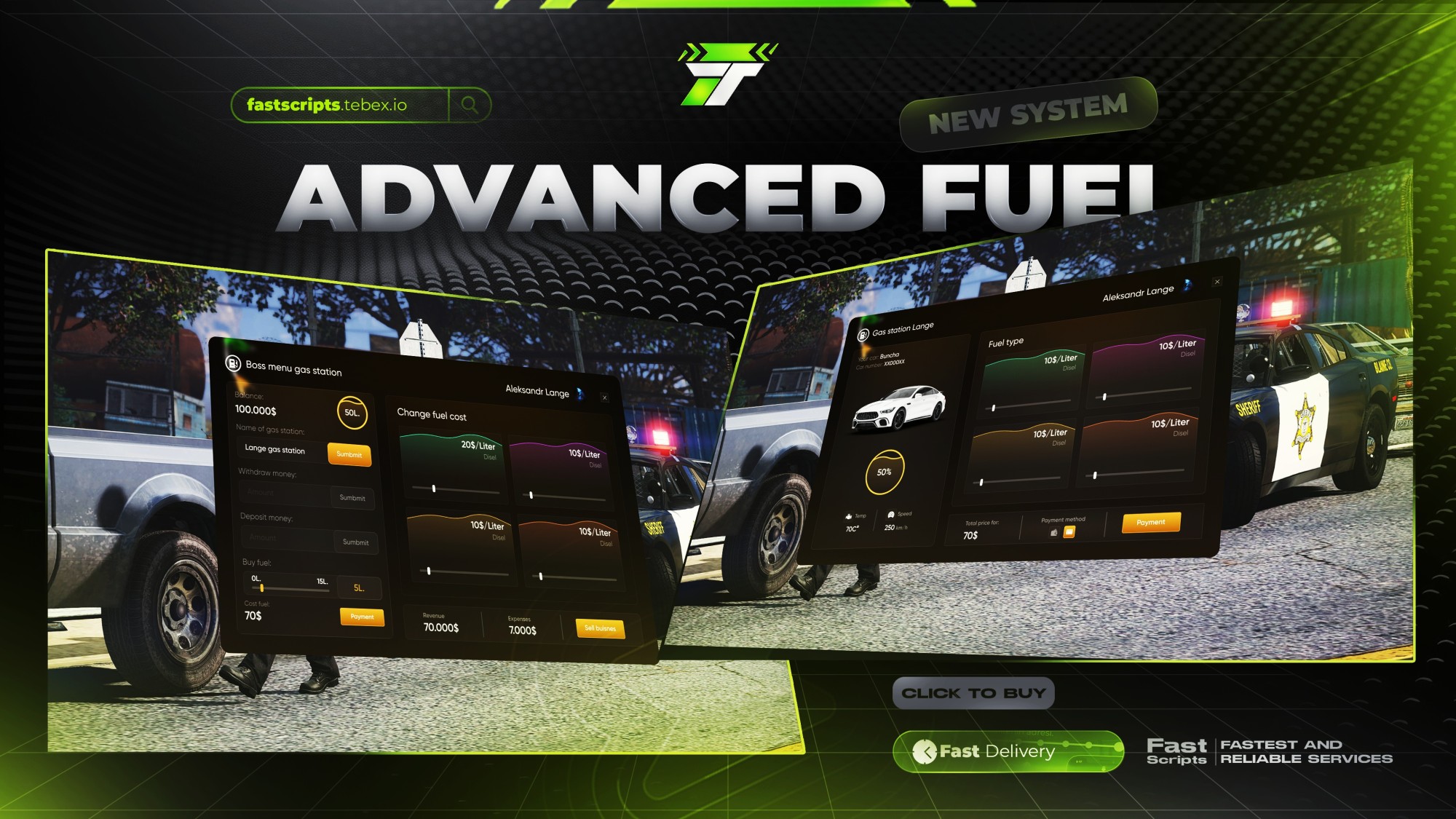
Advanced Fuel
Supported Frameworks
Preview
General Features:
Vehicle Information:
- The vehicle's name and license plate number are displayed (e.g., "Buncha" and "XX000XX").
- Vehicle status details:
- Fuel level (e.g., 50%).
- Engine temperature (e.g., 70°C).
- Maximum speed (e.g., 250 km/h).
Fuel Types and Pricing:
- 4 different fuel types are available (e.g., Diesel).
- The price per liter of each fuel type can be adjusted (e.g., 10$/Liter or 20$/Liter).
- The fuel amount can be selected using a slider.
Payment Options:
- The total payment amount is calculated (e.g., 70$).
- Two different payment methods are available:
- Credit/Bank card
- Cash payment.
Gas Station Business Management:
Change Gas Station Name:
- The gas station name can be changed, allowing ownership of different gas stations.
Current Balance and Fuel Amount:
- The current balance is displayed (e.g., 100,000$).
- The fuel amount in the tank is monitored (e.g., 50L).
- New fuel can be purchased, and the purchase cost is calculated.
Deposit and Withdraw Money:
- The gas station owner can deposit or withdraw money from the balance.
- For example, a certain amount of money can be withdrawn or deposited.
Revenue and Expenses Tracking:
- The revenue and expenses of the gas station are displayed:
- Revenue: e.g., 70,000$.
- Expenses: e.g., 7,000$.
- This helps track the gas station's profit and loss status.
- The revenue and expenses of the gas station are displayed:
Gas Station Sale:
- The gas station owner can sell or transfer ownership to another player.
Purchase Menu:
- Available Purchases:
- Gas station owners have access to a purchase menu consisting of 7 different pages.
- This menu includes various equipment, vehicles, upgrades, or features that can be bought for the gas station.
- The pages offer a wide range of products, allowing the business to grow.
Gas Station Transfer Feature:
- Gas Station Transfer:
- Gas station owners can transfer ownership of their business to another player.
- The transfer process includes all business rights and elements such as the fuel depot.
- This feature makes the in-game economy more dynamic.
Featured Products


Recent Payments


![MulticharacterV2 [QB QBox]](http://dunb17ur4ymx4.cloudfront.net/packages/images/c8efcf17460854a00bc1f561019a2d6c5aae815b.png)

01 Are your FiveM scripts compatible with ESX, QBCore, and other popular frameworks?
Absolutely! Most of our premium FiveM scripts are designed for broad compatibility, especially with leading frameworks like ESX (ExtendedServer) and QBCore. Specific framework requirements and compatibility details are clearly listed on each script's product page in our Tebex store. We strive to ensure seamless integration for your FiveM server.
02 How optimized are your FiveM scripts for server performance (Resmon/MS)?
Performance is a top priority. Our FiveM scripts are meticulously optimized to ensure minimal impact on server resources (low Resmon values and server-side ms). We focus on efficient coding practices to provide a smooth, lag-free experience for your players while delivering rich features.
03 Do you offer installation support and documentation for your FiveM scripts?
Yes, we do! Each FiveM script purchase includes comprehensive documentation with clear, step-by-step installation guides. If you encounter any issues or need assistance with setup or configuration, our dedicated support team is available via Discord or our ticket system to help you get your script running smoothly.
04 How often are your FiveM scripts updated, and how do I receive updates?
We are committed to maintaining and improving our FiveM scripts. Updates are released regularly to introduce new features, enhance compatibility (e.g., with new FiveM builds or framework updates), and address any reported bugs. You'll typically receive update notifications and download links through your Tebex account or our community Discord.
05 Can I customize or configure your FiveM scripts to fit my server's needs?
Definitely! Our FiveM scripts are designed with flexibility in mind. Most scripts come with extensive configuration files (config.lua or similar) allowing you to easily tweak settings, change text, adjust features, and integrate them perfectly with your unique FiveM server environment without needing to alter core code.
06 What makes your FiveM Tebex scripts different from free or leaked scripts?
Our premium FiveM scripts offer superior quality, ongoing dedicated support, regular updates, and robust security. Unlike many free or leaked scripts that may be outdated, buggy, or contain malicious code (backdoors), our scripts are developed professionally, ensuring stability, performance, and a safe environment for your FiveM server.
07 What kind of FiveM scripts do you offer in your Tebex store? (e.g., jobs, activities, UI)
Our Tebex store features a diverse range of high-quality FiveM scripts, including immersive job systems, engaging player activities, advanced UI enhancements, utility scripts, administrative tools, and much more. We aim to provide unique and innovative scripts to elevate the roleplaying experience on any FiveM server. Browse our categories to find the perfect script for you!

